|
A
First Impression Closing
off Reason 3.04 and opening Reason 8.0:
obviously, that's an overwhelming
experience. Even preparation in the form of
checking tutorials and You Tube video's from
the Swedish developers can not prevent the
effects of this virtual time travel. This is
like getting off a bicycle and stepping in a
luxury car! Reason
3, you could say, is to Reason 8 what
Rebirth was to Reason 3. Where you could
hook up Propellerhead's first software seamlessly
in Reason, Reason 8 has almost all the
features of it's previous versions
seamlessly integrated with the first new
feature that draws the attention: the Master
Mixing Console. In one word: wow! This is definitely the kind of
console every DUB engineer has these
specific dreams of. Where
the Reason known to us here in the Dubroom
contained a sequencer and a device part,
Reason added the Master Mixing Console as a
third part of the program. You can have one
window for your sequencer, one for your
device rack and one for the extensive
console. Unlike Reason 3, your rack is not
limited to one vertical line of devices. You
can build your rack as high and wide as you
like to. Big improvement! Before
there were computers and programmable
sequencers, there was DUB. In essence, DUB
is the art of remixing an audio multi-track
recording of a band playing a Reggae riddim.
In a way, even using loops and drum
computers are just a simulation of that. The
best DUB is actually made from physical
audio recordings. Guess
what? Reason gives you this very
possibility. For
example: you can create your own Drum sound,
program a rhythm from start to stop and
render the whole thing to an audio track. Do
this with all your instrument sections and
you have a de facto multi-track audio
recording in just the right way for an
authentic DUB session. Or simply load
multi-track stems and off you go. Sure,
the console isn't a new feature in Reason 8.
Neither are it's audio tracks. What is new, is the
browser. That browser is quite an
improvement indeed. It gives you
context-sensitive options, while it
remembers where you have stored your
settings and files when you didn't do it in the default
manner. It finds files much quicker, too, a
thing that will please a lot of Reason
users. Overall,
browsing and basically navigating through
the different parts is pretty intuitive.
After all, you know why you launch Reason.
You'll need a sequencer, you'll need effects
and you need a mixing board. You want to
make music. DUB music. A
Closer Look Where
versions prior to Reason 6 basically had the
sequencer and the device rack, 2011 (when
Reason 6 was announced) introduced a
mixing console next to the device rack and
the sequencer. Later on in this
review we'll take an in-depth look at this
console, but the mere fact it has been given
it's own part rather than a place in the
rack is very telling. After
all, for a Dub engineer the console is more
than half the work. The console is the
heart, the HQ from where all the music is
processed and all the effects are driven.
For a Dub engineer, the console is where
most of the work is done. The better the
console, the less you have to do things on
the devices themselves. Well, this console
does a lot. The
fact that Reason will accept Multi-Track
audio recordings or stems should
make it
possible to set up the DAW for a first
"quick" Dub session. Drums, Bass,
Skanks and Horns. The console gives us no
less than eight aux sends, so three
different delays, two reverbs, a phaser, a
filter and the Audiomatic effect just
because it's new. That's a total of 12
channels: four audio, eight effects. The
effects have their own channel rather than a
mere plug in to the returns, but that's nothing
new for the Dub producer. Setting
things up for a first Dub mix reveals the
way the rack works with the console. Within
the rack, audio and console tracks have
their own little device. You link the output
from your device into the input of the
"mix track" and that's it. Again,
reading it is more difficult than actually
doing it. Take
your time looking at the following screen
shot (click to enlarge): 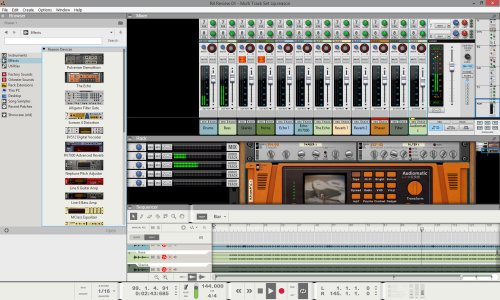
Click to Enlarge
On
the left you see the browser. It can be
scaled and minimized. Dragging devices from
the browser to the rack is easy. Just press
the shift key while you do it, otherwise
Reason will connect the device for you and a
Dub engineer wants to make his own
connections. At the bottom is the sequencer,
the racks are in the middle and the console
is at the top. All three, like the browser,
completely scalable and they can even appear
all three in their own window for maximum convenience. A
First Session Having
just four audio tracks and a couple of
effect devices connected to the main console
should be good enough for a first Dub
session. And it is, for the four
audio tracks (channels 1-4). Reason makes an
audio channel on the main console and
automation goes smoothly. Things are
a bit different for the effect channels (5 and
beyond), since you have to make sequencer
tracks for these channels and subsequently
arm them for automation. Without
touching the effect devices, without
regarding a proper sound balance, just
testing the automation on the console and
some of the EQ it features. The result can
be seen and heard in this next video, while
you can read some spontaneous first
impression comments:
Every
DAW has their own specific ways of dealing
with automation. Using them in your own way
requires time, practice and study. In this
first impression of Reason 8.0 at work, it
was not really clear that audio channels are
armed for automation automatically while
other channels at the console are not. A
minor issue that was solved very quickly
after posting a question on the
Propellerhead website's forum. The console
works friendly. When tracks are properly
armed automation is recorded smoothly. Reason picks it up and
everything works the way you connect it and
the way you touch the buttons. This
is really important for Dub mixing since
most of the Dub action takes place on the
console's channels. Dubs have some heavy (un)muting
of different channels at the same time, while effects are layered on
top of each other. This all needs to be
recorded in automation without problems,
while the console should do what is says it
is doing. The
console needs to be examined first.
|